My terminal needed air traffic control

I have a bad habit: when a tool makes me faster, I immediately use that speed to create a new mess.
That is basically what happened with AI coding agents.
I have been using agentic coding tools for long enough that the novelty is gone. The routine is pretty normal now: one agent writes code, another reviews a diff, another is parked in a different repo waiting for permission, and I am moving through tmux trying to keep the whole thing from turning into terminal soup.
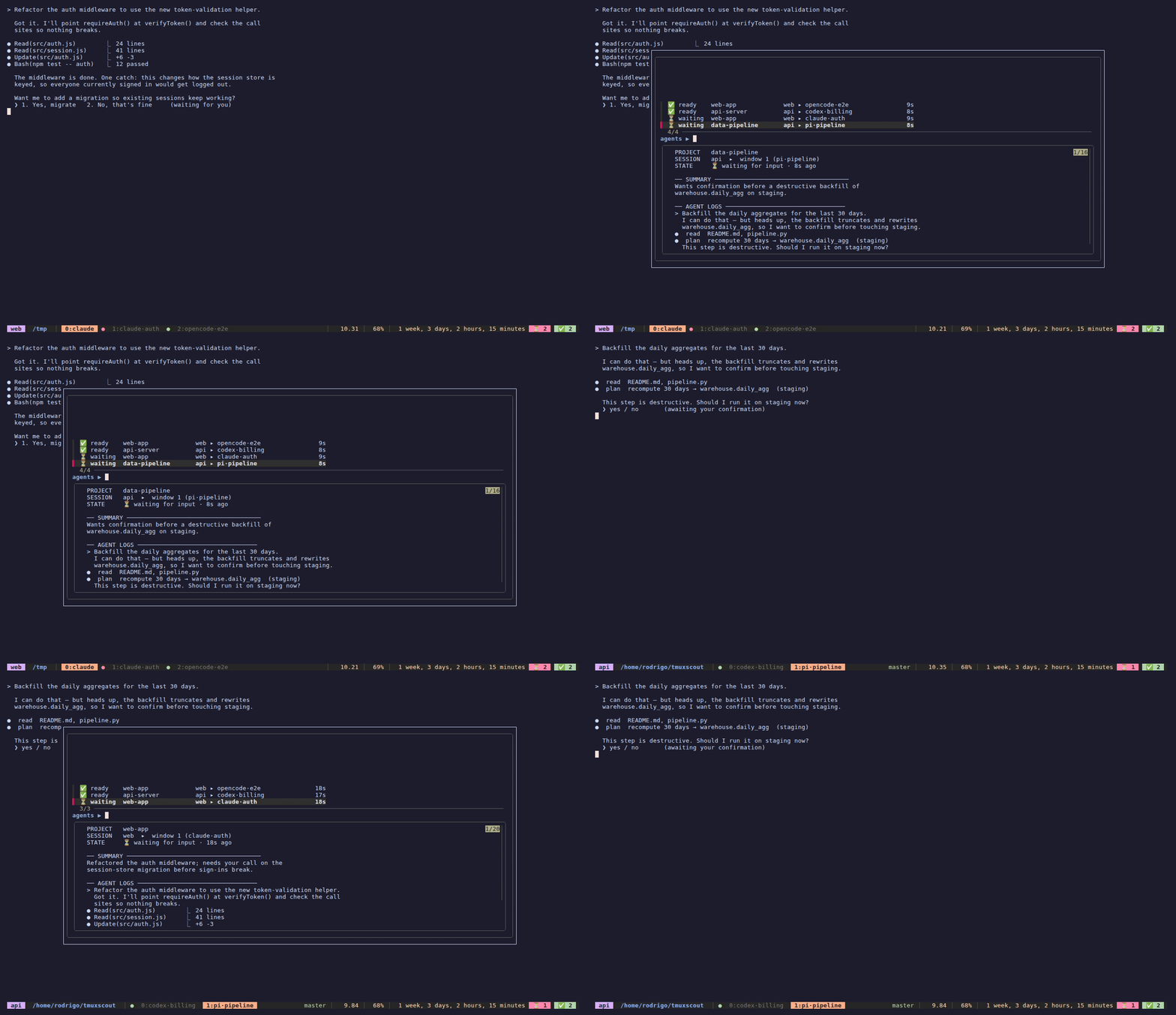
The agents were not the hard part anymore. Keeping track of them was.
Sometimes a task finished and sat there longer than it should have. Sometimes an agent needed input, but I only noticed after I had already moved on. Sometimes I knew there was useful work waiting somewhere, but not which session had it.
Not a dramatic problem. Just a constant little tax.
So I made the terminal complain less.
The actual problem
My normal setup is tmux with separate sessions and windows per project. I have commands and muscle memory for moving around, so navigation itself is not the issue.
The issue is attention.
A normal session can look like this:
- Claude Code is changing something in one repo
- OpenCode is waiting for a permission approval in another
- pi finished a small task and is ready for review
- Codex is reviewing my code in a different tmux session
- I am deep in another pane and do not want to keep checking everything manually
The silly part is that every agent already knows its own state. Claude Code knows when it stops. OpenCode knows when it needs permission. Codex knows when a turn completes.
But my workflow still had this manual polling loop in the middle.
That is a very 2026 kind of bug: automate the coding, then babysit the automation by hand.
What I wanted instead
I did not want a dashboard. I did not want a web app. I definitely did not want a daemon scraping terminal output and guessing whether silence meant "done" or "thinking very deeply about a semicolon."
I wanted something small:
- when an agent finishes, mark the pane
- when an agent needs me, mark the pane differently
- show a tiny badge in tmux
- give me one shortcut to jump to the right place
That became tmuxscout.
tmuxscout
tmuxscout is a small tmux navigator for parallel AI coding agents.
When an agent finishes a turn or needs input, it calls one command:
tmuxscout mark done
# or
tmuxscout mark waiting
That flag is stored on the tmux pane itself. No service. No polling loop. No SQLite database for my inability to remember where I put Codex.
The tmux status bar shows a passive badge:
⏳ 1 ✅ 3
One agent needs input. Three finished while I was doing something else.
Then I hit:
prefix + a
A popup opens with the flagged agents. I pick one, tmux jumps to the right session, window, and pane, and the alert clears when I visit it.
That is basically the whole product.
Small tools are underrated.
Why this feels different
Before this, running multiple agents felt like opening too many browser tabs, except the tabs were tmux panes and some of them were trying to edit my codebase.
Everything was technically there, but the state lived in my head:
"Did I leave Claude waiting on a permission prompt?"
"Which tmux window had the refactor?"
"Did Codex finish reviewing that change?"
"Why is there a pane called tmp and why does it look angry?"
Now I wait for the badge.
That is the whole improvement. It is not magic. It just removes a bunch of tiny checks that used to interrupt my flow. I can leave agents running in different projects and trust tmux to tell me when one of them wants attention.
It feels less like juggling terminals and more like triaging background work.
Still chaotic. Just less stupid.
How it works
The design is event driven.
The agent sends a lifecycle event. The integration maps that event to done or waiting. tmuxscout stores the state on the pane. The status bar and popup read from tmux.
agent finishes or needs input
        |
        v
integration calls tmuxscout mark done|waiting
        |
        v
state is stored on the tmux pane
        |
        v
badge updates, popup lists flagged panes
        |
        v
select one and jump to the agent
The important part is what it does not do.
It does not parse terminal output. It does not wait for quiet periods. It does not guess.
Guessing is how you get a notification because a test suite paused for a second to download half of npm.
The agent already has the signal. Use the signal.
The integrations
Right now I have it wired into the tools I use most:
| Agent | Event | tmuxscout state |
|---|---|---|
| Claude Code | Stop | done |
| Claude Code | Notification | waiting |
| OpenCode | session.idle | done |
| OpenCode | permission.updated | waiting |
| pi | agent_end | done |
| Codex | agent-turn-complete | done |
Each agent has its own idea of what a lifecycle hook should look like, because apparently agreeing on one boring event format would be too kind.
Claude Code was the cleanest. It has hooks in ~/.claude/settings.json, and those hooks can read the transcript path from the JSON payload. That means the popup can show a useful one-line summary of what just happened.
OpenCode uses a plugin. When the session goes idle, the plugin marks the pane as done. When a permission changes, it marks the pane as waiting.
pi has an agent_end event, so that part was simple.
Codex was the funny one. I often use it as a second pair of eyes to review code, and its notify hook can run from a detached app server. That means it does not always know which tmux pane it belongs to. I had to map the event back to the pane by checking process ancestry, Codex TUI processes, and finally the working directory when it is unambiguous.
I would rather miss a notification than jump to the wrong pane. Wrong jumps are cursed.
The tmux trick
The part I like most is that tmux already gives me a decent state store.
Each pane can have options, so tmuxscout stores:
@agent_status   done|waiting
@agent_done_at  epoch seconds
@agent_label    project name
@agent_summary  short summary
The global badge is just two counters:
@agent_waiting
@agent_done
When a pane closes, its options disappear with it. Cleanup solved by not inventing cleanup.
There is also a small anti-noise rule: if I am already looking at the pane when the agent finishes, do not flag it. I can see it. I do not need my status bar congratulating me for observing the thing in front of my face.
Setup
Install it wherever you want. I keep it in ~/tmuxscout:
git clone https://github.com/klosowsk/tmuxscout ~/tmuxscout
~/tmuxscout/install.sh
Then check what got wired:
tmuxscout doctor
The installer can configure tmux and any detected agents:
tmuxscout setup all
If you do not like installers touching your config, print the snippets instead:
tmuxscout setup all --print
The default shortcut is:
prefix + a
The main runtime command is intentionally boring:
tmuxscout mark done|waiting [label] [summary]
That means anything can integrate with it. If some future agent can run a shell command when it finishes, it can show up in the same popup.
What changed in my workflow
I now treat agents more like background workers.
I start one, give it a task, move to another project, and stop worrying about where it is. If it finishes, I get a green count. If it needs me, I get the waiting count. When I have time, I open the popup and triage.
This is the tiny UX layer I was missing.
The agent tools are getting powerful, but the coordination layer is still weirdly primitive. Everyone talks about bigger context windows and better coding benchmarks. I mostly wanted my terminal to stop playing hide and seek.
tmuxscout is not ambitious. That is why I like it.
It made tmux feel a little more like a queue for agent work, without turning it into another app I need to manage.
And yes, the name is a little dramatic for a shell script.
But after losing an agent in a tmux session called scratch-2 for the third time, I think I earned it.